PDF Annotations belong to a specific PDFPage and may be created/changed/removed. Because annotation appearances may change (for several reasons) it is possible to scan through the annotations on a page and query them to see whether a re-render is necessary.
Additionally redaction annotations can be applied to a PDFPage, destructively removing content from the page.
These are the annotation types, and which attributes they have.
PDFAnnotation.prototype.applyRedaction
or PDFPage.prototype.applyRedactions.
These annotation types are special and handled with other APIs:
PDFAnnotation.prototype.setPopup()You cannot create instances of this class with the new operator!
To get the annotations on a page use PDFPage.prototype.getAnnotations().
To create a new annotation call PDFPage.prototype.createAnnotation().
Returns a rectangle containing the location and dimension of the annotation.
var bounds = annotation.getBounds()Calls the device functions to draw the annotation.
annotation.run(device, mupdf.Matrix.identity)Render the annotation into a Pixmap, using
the transform, colorspace and
alpha parameters.
Matrix) – Transformation
matrix.ColorSpace) – The
desired colorspace of the returned pixmap.boolean) – Whether the returned
pixmap has transparency or not. If the pixmap handles transparency, it
starts out transparent (otherwise it is filled white), before the
contents of the display list are rendered onto the pixmap.var pixmap = annotation.toPixmap(mupdf.Matrix.identity, mupdf.ColorSpace.DeviceRGB, true)Record the contents of the annotation into a DisplayList.
var displayList = annotation.toDisplayList()Get the underlying PDFObject for an annotation.
var obj = annotation.getObject()Set the annotation appearance stream for the given appearance. The desired appearance is given as a transform along with a bounding box, a PDF dictionary of resources and a content stream.
string | null) –
Appearance stream (“N” for normal, “R” for roll-over or “D” for down).
Defaults to “N”.string | null) – The annotation
state to set the appearance for or null for the current state. Only
widget annotations of pushbutton, check box, or radio button type have
states, which are “Off” or “Yes”. For other types of annotations pass
null.Matrix) – The transformation
matrix.Rect) – The bounding box.,PDFObject) – Resources
object.Buffer | ArrayBuffer | Uint8Array | string) – Contents
string.annotation.setAppearance(
"N",
null,
mupdf.Matrix.identity,
[0, 0, 100, 100],
resources,
contents
)Update the appearance stream to account for changes in the annotation.
Returns true if the annotation appearance changed during the call.
annotation.update()Set the annotation appearance stream for the given appearance. The desired appearance is given as a transform along with a display list.
string) – Appearance
stream (“N”, “R” or “D”).string) – The annotation state
to set the appearance for or null for the current state. Only widget
annotations of pushbutton, check box, or radio button type have states,
which are “Off” or “Yes”. For other types of annotations pass null.Matrix) – The transformation
matrix.DisplayList) – The
display list.annotation.setAppearanceFromDisplayList(
"N",
null,
mupdf.Matrix.identity,
displayList
)Get a special annotation hidden flag for editing. This flag prevents the annotation from being rendered.
var hidden = annotation.getHiddenForEditing()Set a special annotation hidden flag for editing. This flag prevents the annotation from being rendered.
boolean)annotation.setHiddenForEditing(true)only mutool run
Check if the annotation is hot, i.e. that the pointing device’s cursor is hovering over the annotation.
annotation.getHot()only mutool run
Set the annotation as being hot, i.e. that the pointing device’s cursor is hovering over the annotation.
boolean)annotation.setHot(true)only mutool run
Request that if an annotation does not have an appearance stream,
flag the annotation to have one generated. The appearance stream will be
created during future calls to PDFAnnotation.prototype.update()
on or PDFPage.prototype.update().
annotation.requestSynthesis()only mutool run
Request that an appearance stream shall be re-generated for an
annotation next time update() is called on PDFAnnotation.prototype.update()
or PDFPage.prototype.update().
This is a side-effect of setting annotation attributes through the PDFAnnotation interface, so normally this call does not need to be done explicitly.
annotation.requestResynthesis()only mutool run
Run through the annotation appearance stream and call methods on the supplied PDFProcessor.
PDFProcessor) –
User defined function.annotation.process(processor)Applies a single Redaction annotation.
See PDFPage.prototype.applyRedactions
for details.
PDF Annotations have many attributes. Some of these are common to all annotations, and some only exist on specific annotation types.
Return the annotation type for this annotation.
var type = annotation.getType()Get the annotation flags.
See PDFAnnotation.prototype.setFlags.
var flags = annotation.getFlags()Set the annotation flags.
number) – A bit mask with the
flags (see below).| Bit | Name |
|---|---|
| 1 | Invisible |
| 2 | Hidden |
| 3 | |
| 4 | NoZoom |
| 5 | NoRotate |
| 6 | NoView |
| 7 | ReadOnly |
| 8 | Locked |
| 9 | ToggleNoView |
| 10 | LockedContents |
annotation.setFlags(4) // Clears all other flags and sets "NoZoom".Get the annotation name, a string uniquely identifying the annotation among all annotations on its page.
Set the annotation name.
string)Get the annotation contents.
var contents = annotation.getContents()Set the annotation contents.
string)annotation.setContents("Hello World")Get the annotation creation date as a Date object.
var date = annotation.getCreationDate()Set the creation date.
Date) – A Date object.annotation.setCreationDate(new Date())Get the annotation modification date as a Date object.
var date = annotation.getModificationDate()Set the modification date.
Date)annotation.setModificationDate(new Date())Get the annotation language code (or get the one inherited from the document).
var language = annotation.getLanguage()Set the annotation language code.
string) – The desired
language code.annotation.setLanguage("en")For annotations that can be resized by setting its bounding box
rectangle (e.g. Square and FreeText), PDFAnnotation.prototype.hasRect()
returns true.
Other annotation types, (e.g. Line, Polygon, and InkList) change size by adding/removing vertices. Yet other annotations (e.g. Highlight and StrikeOut) change size by adding/removing QuadPoints.
The underlying Rect attribute on the PDF object is automatically updated as needed for these other annotation types.
Checks whether the annotation can be resized by setting its bounding box.
var hasRect = annotation.hasRect()Get the annotation bounding box.
var rect = annotation.getRect()Set the annotation bounding box.
Rect) – The new desired bounding
box.annotation.setRect([0, 0, 100, 100])Returns whether the annotation is capable of supporting rich text contents.
var hasRichContents = annotation.hasRichContents()Obtain the annotation’s rich-text contents, as opposed to the plain
text contents obtained by getContents().
var richContents = annotation.getRichContents()Set the annotation’s rich-text contents, as opposed to the plain text
contents set by setContents().
string)string)annotation.setRichContents("plain text", "<b><i>Rich-Text</i></b>")Get the default style used for the annotation’s rich-text contents.
var richDefaults = annotation.getRichDefaults()Set the default style used for the annotation’s rich-text contents.
string)annotation.setRichDefaults("font-size: 16pt")The meaning of the color attribute depends on the annotation type. For some it is the color of the border.
Get the annotation color, represented as an array of 0, 1, 3, or 4 component values.
var color = annotation.getColor()Set the annotation color, represented as an array of 0, 1, 3, or 4 component values.
Color) – The new color.annotation.setColor([0, 1, 0])Get the annotation opacity.
var opacity = annotation.getOpacity()Set the annotation opacity.
number) – The desired
opacity.annotation.setOpacity(0.5)only mutool run
Returns whether the annotation is capable of supporting quadding (justification).
var hasQuadding = annotation.hasQuadding()Get the annotation quadding (justification). Quadding value, 0 for left-justified, 1 for centered, 2 for right-justified
var quadding = annotation.getQuadding()Set the annotation quadding (justification). Quadding value, 0 for left-justified, 1 for centered, 2 for right-justified.
number) – The desired
quadding.annotation.setQuadding(1)Returns whether the annotation is capable of supporting an author.
var hasAuthor = annotation.hasAuthor()Gets the annotation author.
var author = annotation.getAuthor()Sets the annotation author.
string)annotation.setAuthor("Jane Doe")Returns whether the annotation may have a subject.
var hasSubject = annotation.hasSubject()Get the annotation subject.
var subject = annotation.getSubject()Set the annotation subject.
string)annotation.setSubject("Re: Dinner on tuesday?")Returns whether the annotation is capable of supporting a border.
var hasBorder = annotation.hasBorder()Get the annotation border style.
var borderStyle = annotation.getBorderStyle()Set the annotation border style.
string) – The annotation
style.annotation.setBorderStyle("Dashed")Get the border width in points.
var w = annotation.getBorderWidth()Set the border width in points. Retains any existing border effects.
number)annotation.setBorderWidth(1.5)Returns the number of items in the border dash pattern.
var dashCount = annotation.getBorderDashCount()Returns the length of dash pattern item idx.
number)var length = annotation.getBorderDashItem(0)Set the annotation border dash pattern to the given array of dash item lengths. The supplied array represents the respective line stroke and gap lengths, e.g. [1, 1] sets a small dash and small gap, [2, 1, 4, 1] would set a medium dash, a small gap, a longer dash and then another small gap.
Array of number)annotation.setBorderDashPattern([2.0, 1.0, 4.0, 1.0])Clear the entire border dash pattern for an annotation.
annotation.clearBorderDash()Append an item (of the given length) to the end of the border dash pattern.
number)annotation.addBorderDashItem(10.0)Returns whether the annotation is capable of supporting a border effect.
var hasEffect = annotation.hasBorderEffect()Get the border effect.
var effect = annotation.getBorderEffect()Set the border effect.
string) – The border
effect.annotation.setBorderEffect("None")Get the annotation border effect intensity.
var intensity = annotation.getBorderEffectIntensity()Set the annotation border effect intensity. Recommended values are between 0 and 2 inclusive.
number) – Border effect
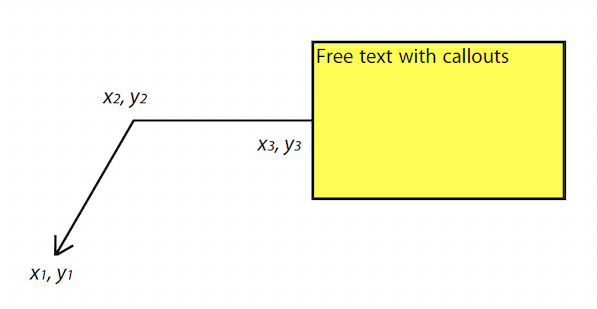
intensity.annotation.setBorderEffectIntensity(1.5)Callouts are used with FreeText annotations and allow for a graphical line to point to an area on a page.
Returns whether the annotation is capable of supporting a callout.
Takes an array of 2 or 3 points. Supply an empty array to remove the callout line.
Array of Point)Returns the array of points.
Takes a point where the callout should point to.
Point)Returns the callout point.
Sets the line ending style of the callout line.
string)Returns the callout style.
only mutool run
Returns whether the annotation is capable of supporting a default appearance.
var hasRect = annotation.hasDefaultAppearance()Get the default text appearance used for free text annotations as an object containing the font, size, and color.
{ font: string, size: number, color: Color }var appearance = annotation.getDefaultAppearance()
console.log("DA font:", appearance.font, appearance.size)
console.log("DA color:", appearance.color)Set the default text appearance used for free text annotations.
string) – The desired default
font: "Helv" | "TiRo" | "Cour" for Helvetica, Times Roman,
and Courier respectively.number) – The desired default
font size.Color) – The desired default
font color.annotation.setDefaultAppearance("Helv", 16, [0, 0, 0])Returns whether the annotation is capable of supporting a file specification.
var hasFilespec = annotation.hasFilespec()Get the file specification PDF object for the file attachment, or null if none set.
var fs = annotation.getFilespec()Set the file specification PDF object for the file attachment.
PDFObject)annotation.setFilespec(fs)Returns whether the annotation is capable of supporting an icon.
var hasIcon = annotation.hasIcon()Get the annotation icon name, either a standard or custom name.
var icon = annotation.getIcon()Set the annotation icon name.
Note that standard icon names can be used to resynthesize the annotation appearance, but custom names cannot.
string) – An icon name.annotation.setIcon("Note")Ink annotations consist of a number of strokes, each consisting of a sequence of vertices between which a smooth line will be drawn.
Returns whether the annotation is capable of supporting an ink list.
var hasInkList = annotation.hasInkList()Get the annotation ink list, represented as an array of strokes. Each stroke consists of an array of points.
var inkList = annotation.getInkList()Set the annotation ink list, represented as an array of strokes. Each stroke consists of an array of points.
Array of Array of Point)// this draws a box with a cross in three strokes:
annotation.setInkList([
[
[0, 0], [10, 0], [10, 10], [0, 10], [0, 0]
],
[
[10, 0], [0, 10]
],
[
[0, 0], [10, 10]
]
])Clear the list of ink strokes for the annotation.
annotation.clearInkList()Add a new empty stroke to the ink annotation.
annotation.addInkListStroke()Append a vertex to end of the last stroke in the ink annotation.
Point)annotation.addInkListStrokeVertex([0, 0])Returns whether the annotation is capable of supporting an interior color.
var hasInteriorColor = annotation.hasInteriorColor()Get the annotation interior color, represented as an array of 0, 1, 3, or 4 component values.
var interiorColor = annotation.getInteriorColor()Sets the annotation interior color.
Color) – The new desired
interior color.annotation.setInteriorColor([0, 1, 1])Returns whether the annotation is capable of supporting a line.
var hasLine = annotation.hasLine()Get line end points, represented by an array of two points, each represented as an [x, y] array.
var line = annotation.getLine()Set the two line end points, each represented as an [x, y] array.
annotation.setLine([100, 100], [150, 175])Returns whether the annotation is capable of supporting line ending style.
var hasLineEndingStyles = annotation.hasLineEndingStyles()Get the start and end line ending style values for each end of the line annotation.
{ start: string, end: string } Returns an object with the
key/value pairsvar lineEndingStyles = annotation.getLineEndingStyles()Sets the line ending style values for each end of the line annotation.
string)string)annotation.setLineEndingStyles("Square", "OpenArrow")In a PDF line leaders refer to two lines at the ends of the line annotation, oriented perpendicular to the line itself. These are common in technical drawings when illustrating distances.
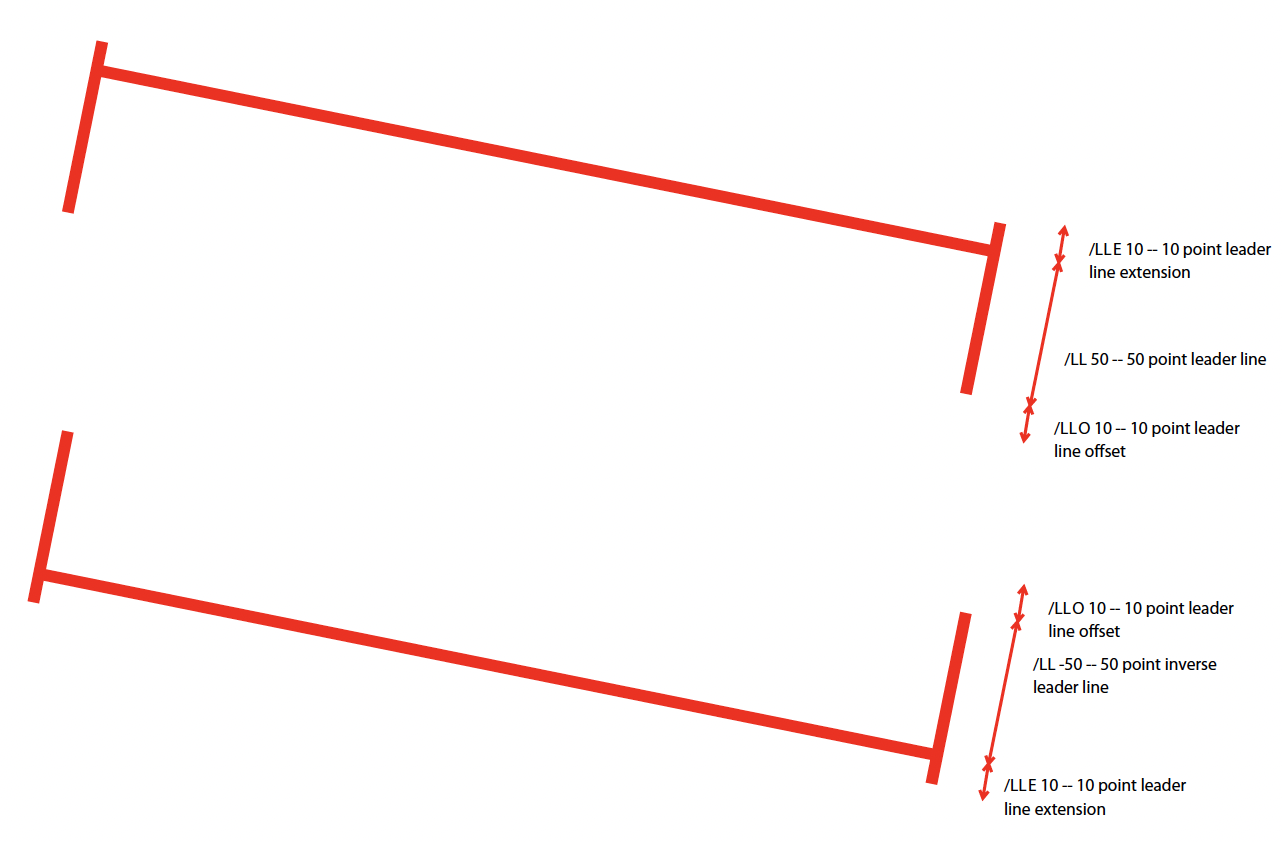
Sets the line leader length.
number) – The length of leader
lines that extend from each endpoint of the line perpendicular to the
line itself. A positive value means that the leader lines appear in the
direction that is clockwise when traversing the line from its starting
point to its ending point a negative value indicates the opposite
direction.Setting a value of 0 effectively removes the line leader.
Gets the line leader length.
Sets the line leader extension.
number) – A non-negative number
representing the length of leader line extensions that extend from the
line proper 180 degrees from the leader lines.Setting a value of 0 effectively removes the line leader extension.
Gets the line leader extension.
Sets the line leader offset.
number) – A non-negative number
representing the length of the leader line offset, which is the amount
of empty space between the endpoints of the annotation and the beginning
of the leader lines.Setting a value of 0 effectively removes the line leader offset.
Gets the line leader offset.
Sets whether line caption is enabled or not.
When line captions are enabled then calling the PDFAnnotation.prototype.setContents
on the line annotation will render the contents onto the line as the
caption text.
boolean)Returns whether the line caption is enabled or not.
Sets the line caption offset.
The x value of the offset point is the horizontal offset along the annotation line from its midpoint, with a positive value indicating offset to the right and a negative value indicating offset to the left. The y value of the offset point is the vertical offset perpendicular to the annotation line, with a positive value indicating a shift up and a negative value indicating a shift down.
Setting a point of [0, 0] removes the caption offset.
 * Arguments: -
point (
Point) – A point specifying the
offset of the caption text from its normal position.
Returns the line caption offset as a point, [x, y].
Open refers to whether the annotation is display in an open state when the page is loaded. A Text Note annotation is considered open if the user has clicked on it to view its contents.
Returns whether the annotation is capable of supporting annotation open state.
var hasOpen = annotation.hasOpen()Get annotation open state.
var isOpen = annotation.getIsOpen()Set annotation open state.
boolean)annotation.setIsOpen(true)only mutool run
Returns whether the annotation is capable of supporting a popup.
var hasPopup = annotation.hasPopup()Get annotation popup rectangle.
var popupRect = annotation.getPopup()Set annotation popup rectangle.
Rect) – The desired area where
the popup should appear.annotation.setPopup([0, 0, 100, 100])Text markup and redaction annotations consist of a set of quadadrilaterals, or QuadPoints. These are used in e.g. Highlight annotations to mark up several disjoint spans of text.
In Javascript QuadPoints are represented with Quad objects.
Returns whether the annotation is capable of supporting quadpoints.
var hasQuadPoints = annotation.hasQuadPoints()Get the annotation’s quadpoints, describing the areas affected by text markup annotations and link annotations.
var quadPoints = annotation.getQuadPoints()Set the annotation quadpoints describing the areas affected by text markup annotations and link annotations.
Array of Quad) – The
quadpoints to set.// two quads, the first one wider than the second one
annotation.setQuadPoints([
[ 100, 100, 200, 100, 200, 150, 100, 150 ],
[ 125, 150, 175, 150, 175, 200, 125, 200 ]
])Clear the list of quadpoints for the annotation.
annotation.clearQuadPoints()Append a single quadpoint to the annotation.
Quad) – The quadpoint to
add.annotation.addQuadPoint([1, 2, 3, 4, 5, 6, 7, 8])Polygon and polyline annotations consist of a sequence of vertices with a straight line between them. Those can be controlled by:
Returns whether the annotation is capable of supporting vertices.
var hasVertices = annotation.hasVertices()Get the annotation vertices, represented as an array of points.
var vertices = annotation.getVertices()Set the annotation vertices, represented as an array of points.
Array of Point)annotation.setVertices([
[0, 0],
[10, 10],
[20, 20]
])Clear the list of vertices for the annotation.
annotation.clearVertices()Append a single vertex point to the annotation.
Point)annotation.addVertex([0, 0])only mutool run
If the annotation is a stamp annotation and it consists of an image, return the PDFObject representing that image.
var pdfobj = annotation.getStampImageObject()only mutool run
Create an appearance stream containing the image passed as argument and set that as the normal appearance of the annotation.
PDFObject) – PDFObject
corresponding to the desired image.annotation.setStampImageObject(imgobj)only mutool run
Add the image passed as argument to the document as a PDF object, and pass a reference to that object to when setting the normal appearance of the stamp annotation.
Image) – The image to become
the stamp annotations appearance.annotation.setStampImage(img)only mutool run
Returns whether the annotation is capable of supporting an intent.
var hasIntent = annotation.hasIntent()Get the annotation intent, one of the values below:
“FreeTextCallout”
“FreeTextTypeWriter”
“LineArrow”
“LineDimension”
“PolyLineDimension”
“PolygonCloud”
“PolygonDimension”
“StampImage”
“StampSnapshot”
Returns: string
var intent = annotation.getIntent()Set the annotation intent.
string) – Intent value, see getIntent()
for permissible values.annotation.setIntent("LineArrow")PDF annotations can have different appearances depending on whether the pointing device’s cursor is hovering over an annotation, or if the pointing device’s button is pressed.
PDF widgets, which is a type of annotation, may also have associated Javascript functions that are executed when certain events occur.
Therefore it is important to tell an PDFAnnotation when the pointing device’s cursor enters/exits an annotation, when it’s button is clicked, or when an annotation gains/loses input focus.
only mutool run
Trigger appearance changes and event handlers for when the pointing device’s cursor enters an annotation’s active area.
annot.eventEnter()only mutool run
Trigger appearance changes and event handlers for when the pointing device’s cursor exits an annotation’s active area.
annot.eventExit()only mutool run
Trigger appearance changes and event handlers for when the pointing device’s button is depressed within an annotation’s active area.
widget.eventDown()only mutool run
Trigger appearance changes and event handlers for when the pointing device’s button is released within an annotation’s active area.
widget.eventUp()only mutool run
Trigger event handlers for when an annotation gains input focus.
widget.eventFocus()only mutool run
Trigger event handlers for when an annotation loses input focus.
widget.eventBlur()