Alpha values are real numbers in the closed interval from 0 to 1, where
0 means full transparency, and 1 means full opacity.
Annotation Type
There are many annotation types defined in the PDF reference.
MuPDF supports the following types:
: Text, FreeText, Square, Circle, Line, Polygon, PolyLine, Highlight,
Underline, Squiggly, StrikeOut, Redact, Stamp, Caret, Ink, Popup,
FileAttachment, Redaction These types are not supported yet:
: Sound, Movie, RichMedia, Widget, Screen, PrinterMark, TrapNet,
Watermark, 3D, Projection
Associated File
TODO
Blend Mode
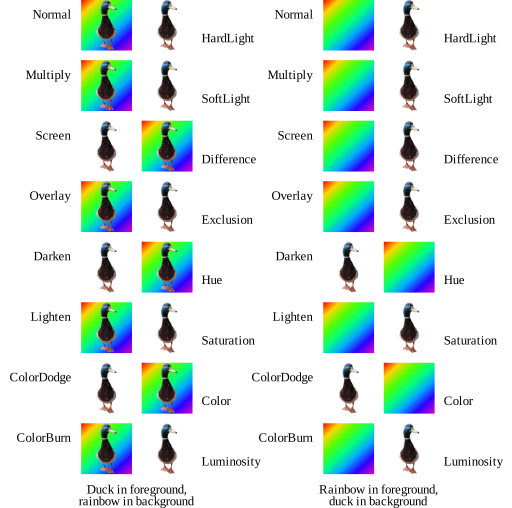
Blend modes define how a layer of graphics combines with a backdrop.
Below is an illustration of the visual effect for RGB colors for
the blend modes defined for PDF. For further details refer to the
PDF specification’s section
on blend modes.
Border Effect
Fancier borders can be drawn with a border effect:
None, Cloudy
Border Style
Annotations have have two border styles:
Solid, Dashed More fancy borders are defined by the border effect.
CMYK JPEG
The situation with JPEG and CMYK colorspaces is complicated, and depends
on many factors such as App markers, the ColorTransform PDF parameter,
and whether a JPEG is intended as a standalone or embedded in PDF.
TODO: explain our behavior, and adobe’s behavior, and when impossible
situations appear
File specification
In PDF a file specification names a file. If a file specification
only contains a file name or a path, then it represents an external
file. Such a file is assumed to be found at the specified location in
the file system. A file specification may also embed the file
contents as a stream inside the PDF. In this case the file specification
represents an embedded file. For embedded files, further metadata may be
stored (e.g. file size, creation and modification date). For more
details read the PDF specification’s section on file
specifications.
Icon Name
Some annotations appear as an icon. The available icons differ per
annotation type. Text
: Comment, Help, Insert, Key, NewParagraph, Note, Paragraph
FileAttachment
: Graph, PaperClip, PushPin, Tag Sound
: Mic, Speaker Stamp
: Approved, AsIs, Confidential, Departmental, Draft, Experimental,
Expired, Final, ForComment, ForPublicRelease, NotApproved,
NotForPublicRelease, Sold, TopSecret
Knockout and Isolation
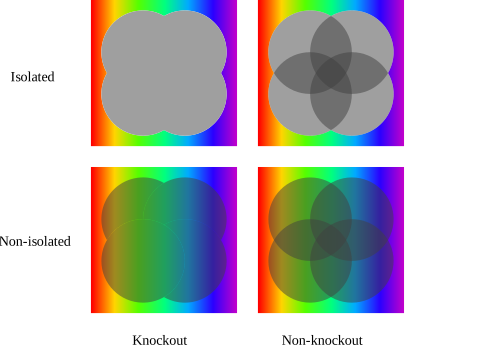
In a knockout transparency group each element overwrites the prior
elements in the group instead of compositing with them. In an
isolated transparency group the group does not composite with the
group’s backdrop, but rather a fully transparent backdrop. For
further details refer to the PDF specification’s sections on isolation
and knockout.
Language code
Language codes consists of a primary code, followed zero or more by
subcodes each preceded by a hyphen, e.g. “en”, “en-US”, “kr”, “zh-CN”,
“zh-TW”. For further details see the PDF specification’s section
on Language
Identifiers.
Line Cap Style
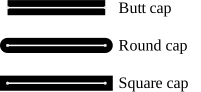
PDFs define three different shapes for the ends of unclosed subpaths:
butt cap, round cap, and square cap. See below for the visual effect and
refer to the PDF specifications section about Line
Cap Styles for details.
Line Ending Style
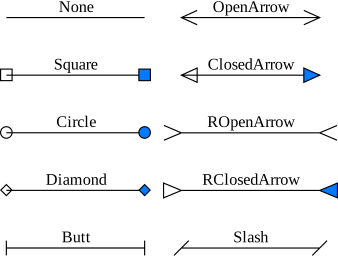
Styles used to draw line endings for certain annotations. Below is an
illustration with the name of each style. The example uses black line
color, with both none and blue interior color.
Line Join Style
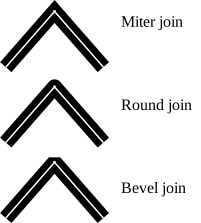
PDFs define three different shapes for the joining of two lines in a
subpath: miter join, round join, and bevel join. See below for the
visual effects and refer to the PDF specifications section about Line
Join Styles for details.
MIME-type
A MIME-type is a string describing the type of data. PDF data has the
MIME-type “application/pdf”, while unknown data has the MIME-type
“application/octet-stream”. For further details see the specification
that the PDF specification references: RFC 2048 - Multipurpose
Internet Mail Extensions (MIME) Part Two: Media Types.
Miter Limit
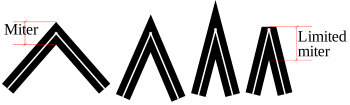
When mitered line joins are used, then lines joining at sharper and
sharper angles will produce longer and longer miters. The miter may
stick out longer than anticipated. Therefore PDF defines a miter limit
value, at which a longer miter join will be changed to a bevel join. See
below for the visual effects and refer to the PDF specifications section
about Miter
Limit for details.
Page Box
The PDF reference defines several boxes to determine different parts of
a page. See the chapter on Page
Boundaries for more details. MediaBox
: The MediaBox defines the size of the physical medium on which the page
is to be printed. It includes items that will be physically trimmed from
the final product like crop marks, registration marks, etc.
CropBox
: The CropBox defines the visible region of the page to be displayed or
printed. This has no real meaning, but is used to clip the page contents
when rendering. BleedBox
: The BleedBox defines the region to which the page contents expect to
be clipped. This includes any extra bleed area to account for
imprecision in the printing process. TrimBox
: The TrimBox defines the intended dimensions of the finished page after
trimming. ArtBox
: The ArtBox defines the area where it is considered safe to place
graphical elements.
QuadPoint
A QuadPoint in PDF is a non-axis aligned quadrilateral, used to define
areas on the page that typically cover text (which may be rotated, or
skewed). It is given as an array of 8 numbers (four x, y pairs).
QuadPoints are used with Link and text markup annotations. The
order of the points is a matter of confusion, because the order used in
the PDF reference doesn’t match the order that Adobe uses. This is
the order that is typically used:
: [ ulx uly urx ury llx lly lrx lry ]
Standard Structure Type
The PDF specification defines how a PDF can specify a logical structure
hierarchy of elements, similar to of HTML or XML. Each of the defined
structure elements, e.g. Div, BlockQuote, P, H1-H6 etc., are
associated with some visual content.
Widget Type
Widgets are a type of annotation. There are a few different subtypes:
Btn
: Pushbutton, Check Boxes, Radio Buttons Tx
: Text Fields Ch
: Choice Fields (list box, combo box) Sig
: Signature Field
Winding
Non-zero Winding Number Rule
Even-Odd Rule
These rules in PDF defined what parts of a Path are
inside and outside the curve respectively. This is used to determine
what parts of a curve should be filled. See the PDF specification
sections on the Non-zero
Winding Number Rule and Even-Odd
Rule.